n-Infinite User Manual
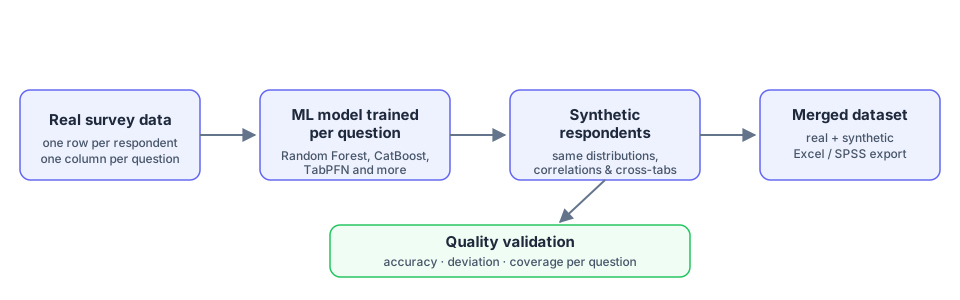
n-Infinite (by Livepanel) is a Machine-Learning-as-a-Service platform that creates synthetic survey data from real respondents. You upload a survey file, the platform trains a machine-learning model per question, and it generates new synthetic respondents that preserve the statistical structure of your real data — expanding your sample while keeping distributions, correlations and cross-tabs consistent.
What you can do with it
- Augment a survey: upload one file and multiply your effective sample.
- Train & predict separately (Advanced mode): train on one dataset and generate answers for a different target sample.
- Validate quality: every project reports per-question accuracy, deviation and coverage, with side-by-side charts of real vs. synthetic distributions.
- Prepare data on the way in: optional pre-processing cleans and reshapes the file, analyzes numeric fields and normalizes open-ended answers before modeling.
- Quota and post-process the output: apply quotas to the generated sample and post-process the final dataset.
- Collaborate: organize projects in folders, assign users per project, and compare projects side by side.
The typical workflow

- Create a project — drop your survey file (Creating a project).
- Processing runs automatically — a model is trained for every question.
- Review quality — check accuracy, deviation and coverage in the charts dashboard (Monitoring & results) and read the Quality certificate.
- Download — the merged file (real + synthetic), predicted data only, SPSS export or a performance report.
Use the navigation menu to walk through each part of the platform.